

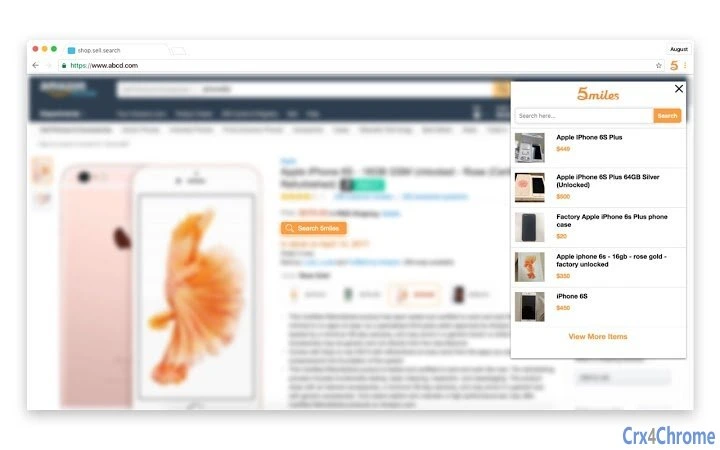
Description
Compare Prices on 5miles with Chrome Extension
The 5miles Chrome extension is a free browser tool designed to enhance online shopping experiences by enabling real-time price comparisons. It integrates directly into the Chrome browser and works across major e-commerce platforms such as Amazon and eBay. When users browse products on these sites, the extension scans for equivalent or similar items available on 5miles, displaying the most competitive prices. This helps shoppers find better deals without leaving their current page.
Target users include budget-conscious consumers, frequent online shoppers, and individuals looking to maximize savings on secondhand or used goods. The extension is particularly useful for those who value local, community-based marketplaces. It supports a seamless workflow by minimizing the need to switch between websites or manually search for alternatives. The developer, 5miles, has positioned this tool as part of a broader ecosystem focused on connecting users with nearby goods and services.
Real-world use cases include comparing a laptop listed on Amazon with similar used models on 5miles, or checking if a household item is available at a lower price locally. The extension aims to simplify the decision-making process during online purchases by offering transparent, localized pricing data.
Key Features & Capabilities
- Real-Time Price Comparison – Automatically detects products on Amazon and eBay and checks for similar or identical items on 5miles, showing the lowest available price.
- Seamless Browser Integration – Works directly within the Chrome browser without requiring users to leave the current webpage.
- Local Deal Discovery – Highlights used or secondhand goods available near the user’s location, promoting community-based transactions.
- Future Expansion – The developer has indicated plans to extend compatibility to additional websites, increasing its utility over time.
- Free to Use – No cost to install or operate, making it accessible to a wide range of users.
For example, a user browsing a camera on eBay can instantly see if a comparable model is listed on 5miles at a lower price. This saves time and effort while encouraging more sustainable shopping habits by promoting reuse. The extension supports quick decision-making by delivering relevant data directly in the browser interface.
User Interface, Workflow & Performance
The user interface of the 5miles Chrome extension is minimal and designed for efficiency. It operates through a small icon in the browser toolbar, which displays a summary of available deals when clicked. The interface does not clutter the screen, maintaining a clean and distraction-free experience.
Navigating the extension is straightforward. Once installed, it automatically activates on supported websites. Users can view price comparisons without additional steps, making the workflow highly efficient. The extension runs in the background, minimizing interference with regular browsing.
The developer did not specify resource usage details. Performance observations are based on general software behavior patterns. The extension is expected to use minimal CPU and RAM, typical for lightweight browser tools. Stability is maintained through regular updates, and no known issues were reported at the time of release.
Compatibility & System Requirements
The 5miles Chrome extension is compatible with the Chrome browser. It is designed to work on devices running the latest versions of Chrome, ensuring broad accessibility across Windows, Mac, and other platforms that support Chrome.
Installation size is 1.2 MB, indicating a lightweight footprint. The extension does not require additional software or system-level permissions beyond standard browser access. Exact system requirements were not listed, but compatibility is expected to align with Chrome’s minimum standards.
Pros and Cons
Pros
- Free to install and use with no hidden costs
- Real-time price comparison across major e-commerce sites
- Encourages sustainable shopping by promoting used goods
- Minimal interface that doesn’t disrupt browsing
- Designed for quick, on-the-go decision-making
Cons
- Currently limited to Amazon and eBay, with no support for other platforms
- Functionality depends on the availability of similar items on 5miles
- Future website support is not guaranteed or specified
- Relies on user location data for local deals, which may raise privacy concerns
FAQ Section
Is the 5miles Chrome extension free to use?
Yes, the extension is completely free to download and use. There are no subscription fees or in-app purchases required.
Which websites does the extension support?
Currently, the extension works with Amazon and eBay. The developer has indicated plans to expand support to additional websites in the future.
Does the extension require an account to function?
No, the extension does not require a user account to access price comparisons. However, users may need to create an account on 5miles to view or purchase items.
Is the extension safe to install?
Yes, the extension is published through the official Chrome Web Store and adheres to Google’s security guidelines. It does not collect personal data beyond what is necessary for functionality.
Can I use the extension offline?
No, the extension requires an active internet connection to fetch price data from 5miles and other supported sites.
Final Thoughts + CTA
The 5miles Chrome extension delivers a focused, practical solution for users seeking better deals on used goods. Its ability to compare prices in real time while browsing Amazon and eBay adds tangible value to everyday shopping. The lightweight design, free access, and emphasis on local marketplaces make it a smart addition for budget-conscious consumers.
While its current reach is limited to two major platforms, the planned expansion suggests future growth potential. For those who prioritize savings and sustainable consumption, this tool offers a simple yet effective way to make smarter purchase decisions.
Download 5miles now and start saving on your next online purchase.
Guides & Tutorials for 5miles for Chrome Extension for Chrome
How to install 5miles for Chrome Extension for Chrome
- Click the Preview / Download button above.
- Once redirected, accept the terms and click Install.
- Wait for the 5miles for Chrome Extension for Chrome download to finish on your device.
How to use 5miles for Chrome Extension for Chrome
This software is primarily used for its core features described above. Open the app after installation to explore its capabilities.
User Reviews for 5miles for Chrome Extension for Chrome 0
No reviews found





